
Best Spots for Digital Screens in Stores
Where to place digital screens—entrances, windows, endcaps and checkouts—to boost engagement and increase in-store sales.
Best Spots for Digital Screens in Stores
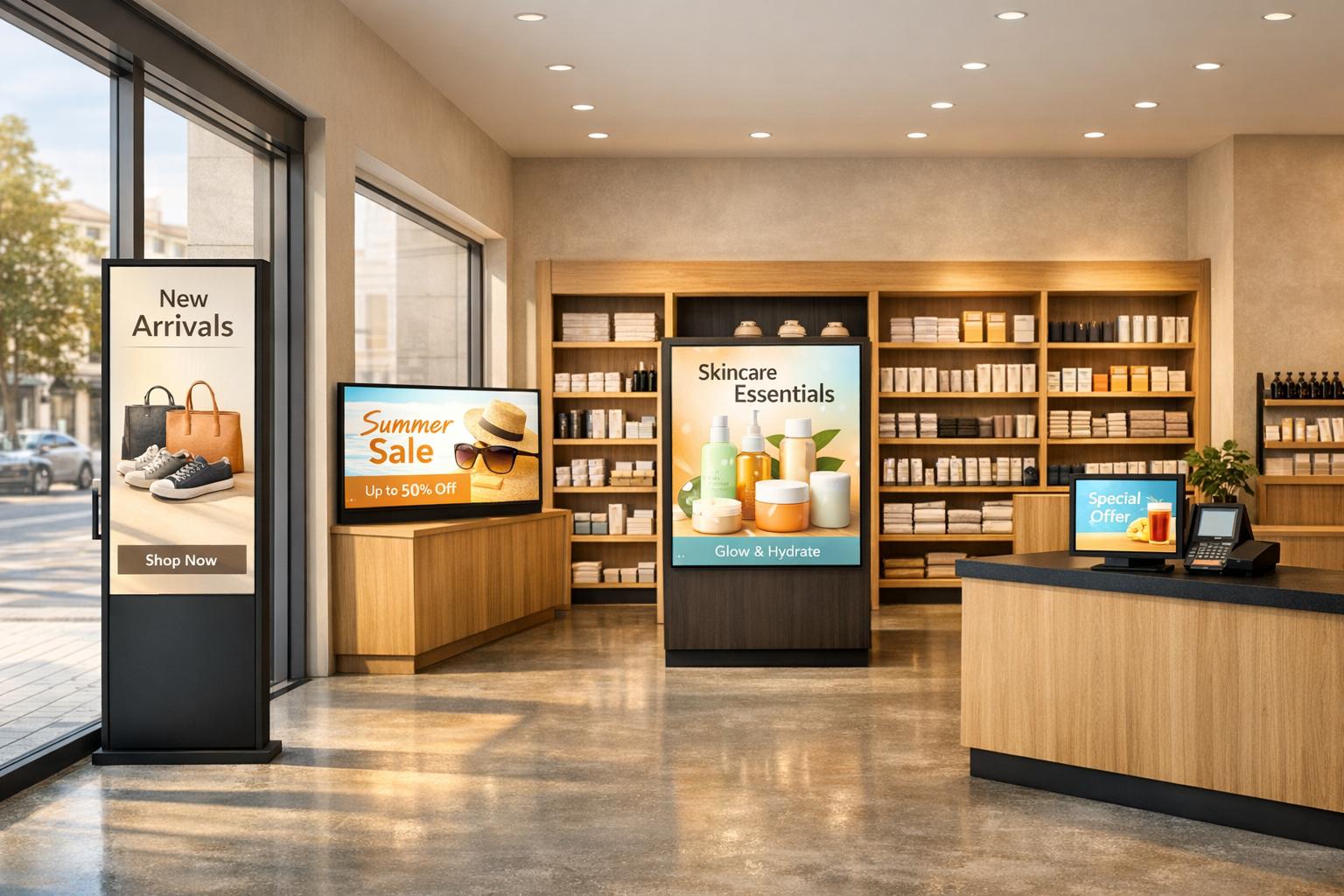
Digital screens can boost retail sales by up to 13.37%, but their effectiveness depends heavily on where they’re placed. Screens positioned in high-traffic areas or natural "pause points" (like aisle intersections, endcaps, or checkout lines) are more likely to grab attention and influence buying decisions. Strategic placement ensures that screens deliver the right message at the right time, turning foot traffic into increased revenue.
Key Takeaways:
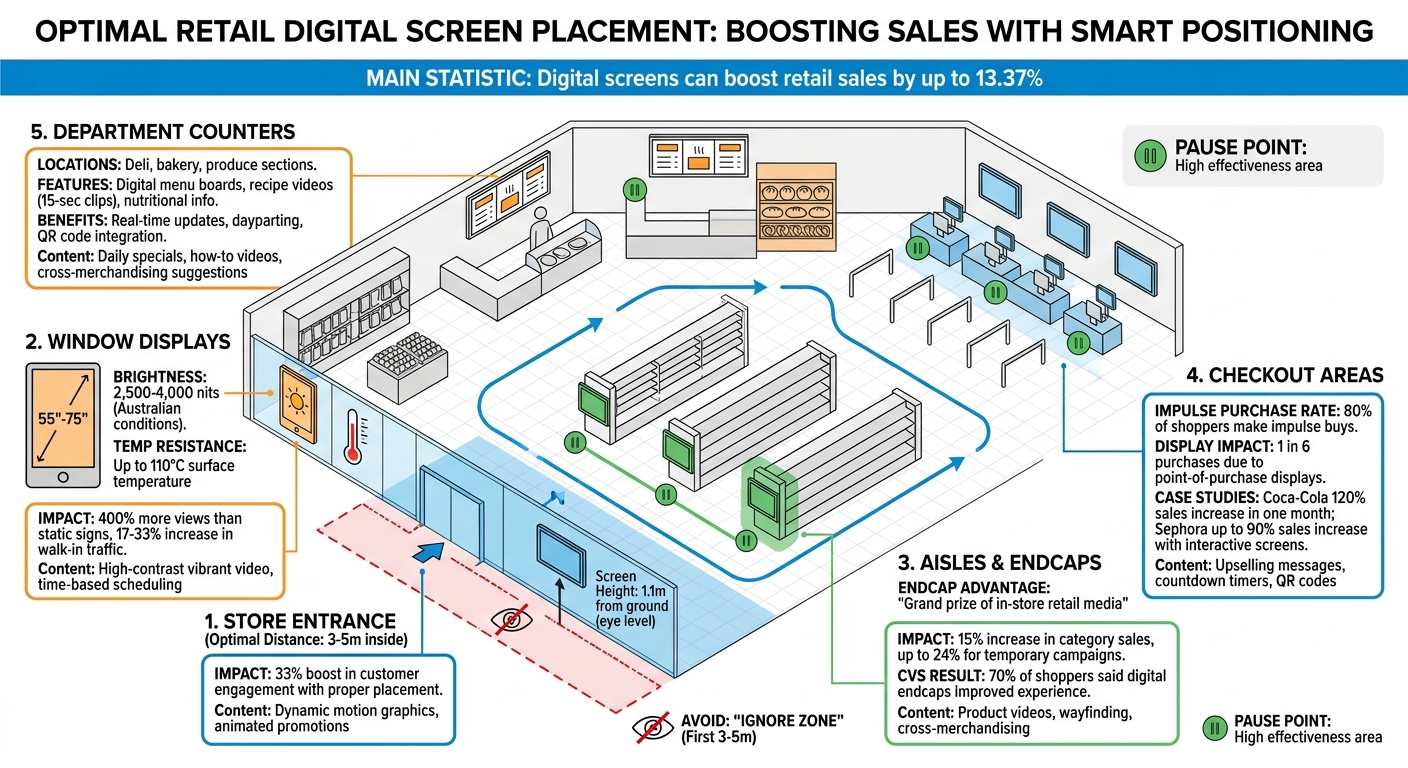
- Entrances: Avoid the "ignore zone" (first 3–5 metres). Place screens slightly further inside at eye level for better engagement.
- Window Displays: Use vibrant, motion-based content to attract pedestrians. Opt for high-brightness screens to combat sunlight glare.
- Aisles & Endcaps: Endcaps are ideal for impulse buys, while aisle screens can guide shoppers or suggest complementary products.
- Checkout Areas: Perfect for last-minute promotions, upselling, and making wait times feel shorter.
- Department Counters: Promote daily specials or provide helpful tips (e.g., recipes in the produce section).
Proper screen placement and dynamic content are essential for making digital signage effective. Tools like Adflux CMS can simplify content management, ensure smooth operation, and even monetise unused screen inventory.
Optimal Digital Screen Placement Zones in Retail Stores
How To Transform In-Store Retail Displays Into Pivotal Revenue Generating Tools
sbb-itb-c231c83
1. Store Entrances and High-Traffic Areas
Store entrances are where first impressions are made, setting the tone for a shopper's experience. Placing screens strategically at the entrance ensures they grab attention at just the right moment.
The 'Ignore Zone' and Optimal Placement Distance
The first few metres inside a store entrance are often referred to as the 'ignore zone'. This is where shoppers are still adjusting to the new environment, making it less effective for engagement. To bypass this, place screens 3–5 metres inside the entrance, where customers are more likely to notice and engage.
Height is just as important as distance. Screens should ideally be mounted about 1.1 metres from the ground, aligning with the average eye level. This positioning eliminates the need for shoppers to tilt their heads up or down, increasing the likelihood that they’ll notice the content. A study from UC San Diego revealed that simply adjusting digital signage placement can boost customer engagement by 33%. Even minor tweaks in positioning can deliver measurable improvements.
This careful placement creates a strong foundation for displaying dynamic content that grabs attention in these bustling areas.
Using Dynamic Content to Attract Attention
Static images often fail to stand out in high-traffic zones. To catch the eye of busy shoppers, use dynamic content like motion graphics, animated promotions, or rotating brand messages. These elements are far more likely to engage quickly than plain text, which requires more time to process.
"The brighter or more visible that content, the more likely they are to see it and act upon it." - DisplayNow
Lighting near entrances can pose challenges. Sunlight streaming through doors can create glare, making screens difficult to read. High-brightness commercial screens are a must for these locations. It's also important to test the screen's visibility from various angles to ensure content remains clear throughout the day.
When screens are positioned correctly and paired with dynamic, engaging content, they become powerful tools for capturing attention and enhancing the shopping experience right from the entrance.
2. Window Displays and Outdoor-Facing Screens
Front window displays play a crucial role in turning pedestrians into customers, significantly boosting foot traffic. Just like in-store screens, the placement and strategy behind window displays are essential for converting casual views into store visits. Research highlights that digital signage in storefront windows grabs 400% more views than traditional static signs and can increase walk-in traffic by 17% to 33% compared to static alternatives. These numbers show the impact that dynamic window displays can have throughout the day.
Displaying Promotions and Brand Messages
Movement is the secret ingredient for effective window screens. Wade Beach, MD of RetailMotion, explains, "If you stick a screen up and you put a static poster on there, you would be better off not doing it". High-contrast, vibrant video or animated content is far more likely to catch the attention of people passing by.
Content scheduling based on the time of day can make these displays even more effective. For instance:
- Energising visuals can target morning commuters.
- Lunchtime promotions can draw in midday shoppers.
- After-hours QR codes can encourage online engagement when the store is closed.
Weather-Resistant Hardware for Australian Conditions
Australia’s climate brings unique challenges for window displays, making it essential to use hardware designed to handle outdoor conditions. Standard indoor screens (350–700 nits) simply don’t cut it in direct sunlight. For most Australian storefronts, screens need to have a brightness rating of 2,500–4,000 nits to remain visible even in harsh glare. In particularly sunny, south-facing locations, even higher brightness levels might be necessary.
Heat management is another critical factor. With Australian summers often pushing screen temperatures above 70°C, standard displays can suffer damage. Commercial-grade screens are built to endure surface temperatures up to 110°C without issues.
When it comes to screen orientation, portrait layouts are often more practical for window displays. They mimic the look of traditional posters while taking up less horizontal space. For typical storefront windows (1.2–2.4 metres wide), displays between 55" and 75" are usually ideal.
3. Aisles and Endcaps
Screens placed in aisles and at endcaps serve two key roles: they guide customers through the store while promoting products at moments when shoppers are most likely to make decisions. After grabbing attention at the entrance, these strategically placed screens keep the momentum going, encouraging engagement throughout the store. Andrew Lipsman, Retail Media Analyst at Media, Ads + Commerce, sums it up perfectly:
"The end cap is 'the grand prize of in-store retail media.' It's probably the most influential point in the store."
The success of endcaps comes down to timing and visibility. Unlike items lost in the clutter of shelves, endcaps create what experts call a "stand-alone experience". These displays are positioned at natural pause points - where aisles end or departments intersect - moments when shoppers are deciding where to head next. Products showcased here sell much faster than those on standard shelves, and adding digital screens boosts this effect even further.
Main Aisle Screens for Wayfinding
Screens in main aisles do more than advertise - they act as navigational tools, helping customers find their way through the store. Think of them as digital signposts, pointing out promotions, new arrivals, or specific departments. This is especially helpful in larger stores, where it’s easy for shoppers to feel disoriented or unsure of where to go.
Positioning is everything. Screens should be at eye level to ensure they’re noticed, and the content should align with what customers are looking for. For instance, placing recipe ideas near grocery staples helps shoppers imagine how products can work together, which could lead to bigger purchases. Proper placement and thoughtful content make these screens a valuable part of the shopping experience.
While aisle screens guide and inform, endcaps take things a step further by turning casual browsing into actual purchases.
Endcap Screens for Product Promotions
Endcaps are built to spark impulse buys. They’re ideal for showcasing high-margin items, weekly deals, or seasonal products. James Hay, Global CEO of Barrows Connected Store, explains their power:
"Digital end caps deliver stronger visual impact, faster creative refreshes and far greater flexibility, turning a single physical placement into a dynamic media asset."
Dynamic content - like videos and animations - paired with physical product displays creates a winning combination. Unlike static images, moving visuals grab attention in busy aisles. At CVS Pharmacy, 70% of shoppers said digital endcap screens improved their experience, particularly when the content provided practical value, such as nutritional details or how-to tutorials. For maximum impact, the bottom section of digital endcaps should feature the actual products being promoted, making it easy for customers to act on what they see.
4. Checkout and Point-of-Purchase Locations
Screens at checkout are a powerful tool for driving last-minute sales. With nearly 80% of shoppers making impulse purchases and one in six purchases happening solely because of a point-of-purchase display, the checkout area becomes a critical opportunity to influence buying decisions. These screens take advantage of a captive audience, turning waiting time into a chance to boost sales and improve overall category performance.
Strategically placed displays in this zone have been shown to increase category sales by 15%. Temporary campaigns at the checkout can achieve even more impressive results, with sales lifts of up to 24%. This final touchpoint is perfect for delivering targeted, real-time promotions that resonate with shoppers in the moment.
Upselling with Targeted Messages
Checkout screens are ideal for encouraging customers to grab one more item before they pay. For example, showcasing complementary products - like batteries alongside electronics - offers convenience and increases the likelihood of additional purchases.
Urgency-driven messaging also thrives here. Countdown timers for flash sales or "buy now" prompts create a sense of time pressure and trigger the fear of missing out. Coca-Cola Amatil tested this approach by adding interactive screens to convenience store coolers, and one promotion resulted in a staggering 120% sales increase for a beverage in just one month. The combination of eye-catching visuals and time-sensitive offers can transform passive interest into action.
These screens can also encourage loyalty program sign-ups by displaying QR codes for instant discounts, offering immediate benefits while fostering long-term customer engagement. This dual approach not only drives immediate sales but also aligns with broader digital strategies across the store.
Making Wait Times Feel Shorter
Beyond driving sales, checkout screens can improve the customer experience by making wait times feel shorter. Engaging content like motion graphics or short product demos captures attention and distracts shoppers from the wait.
Simple yet effective animations - like fizzing bubbles for drinks - or quick how-to videos often outperform static images. Sephora has taken this concept further with smart mirrors and touchscreen kiosks, allowing customers to watch tutorials or virtually try on products. This innovation has doubled conversion rates in some stores, with certain locations reporting sales increases of up to 90%. The takeaway? Screens that entertain or provide practical value enhance the shopping experience and positively impact sales.
5. Department-Specific Counters and Zones
After endcaps and checkout displays, department-specific zones present focused opportunities for digital interaction. Areas like the deli, bakery, and produce sections benefit from digital screens that do more than just advertise - they inform and inspire. These are natural "pause points" where shoppers linger to browse, compare items, or wait for service, making them perfect spots for content that genuinely enhances the shopping experience. These tailored uses of digital technology tie seamlessly into the store's broader digital strategy.
Menu Boards for Deli and Bakery Areas
Digital menu boards bring flexibility and efficiency, showcasing fresh visuals to promote high-margin items. Unlike traditional paper menus, these screens can be updated instantly, allowing staff to highlight daily specials, remove sold-out items, or adjust pricing in real-time. This reduces errors and keeps information accurate.
Dayparting is another valuable feature, automatically shifting content based on the time of day. Morning displays might focus on coffee and pastries, while evening screens highlight dinner options like rotisserie chicken or family meal deals. This smart scheduling ensures the right message reaches customers at just the right moment, all without extra effort from staff. Additionally, digital menus eliminate printing costs and maintain pricing accuracy when integrated with the store's POS system.
In the produce section, screens take on a slightly different role, providing practical and engaging content for shoppers.
Recipe Ideas and Nutritional Information in Produce
Digital screens in the produce area act as silent sales assistants, especially when it comes to unfamiliar or specialty items. Short, 15-second videos demonstrating meal prep can spark dinner ideas and encourage customers to try something new. Practical tips, like how to pick a ripe avocado or store fresh herbs, help build trust and position the store as a go-to source for helpful advice.
Health-focused shoppers respond well to screens highlighting nutritional benefits. Phrases like "High in Vitamin C" or "Rich in Antioxidants" align with their goals while encouraging purchases. Cross-merchandising suggestions, such as "Pair these strawberries with fresh cream from Aisle 5", not only guide shoppers to other departments but also increase basket sizes. QR codes on these screens add another layer of convenience, letting customers save recipes or nutritional information directly to their phones, seamlessly connecting the in-store experience with at-home cooking.
6. Managing Screen Networks with Adflux CMS
After finding the ideal spots for your digital screens, the next step is keeping them running smoothly with engaging and up-to-date content. This is where Adflux CMS steps in, offering a platform that combines digital screen management, in-store audio, and attention analytics - all in one place. Instead of juggling multiple systems or updating screens manually, retailers can manage their entire network from a single, centralised dashboard.
Centralised Content Scheduling
With Adflux CMS, scheduling promotions across multiple locations becomes effortless. For instance, a supermarket chain can pre-schedule content for breakfast, lunch, and dinner promotions, customised for each store’s unique needs. The platform also features a remote hardware monitoring dashboard, which keeps an eye on the health of your network. It alerts teams to potential technical issues, helping you address problems before they affect customers.
AI‑Powered Analytics and Proof‑of‑Play Reporting
Adflux takes campaign performance tracking to the next level with its AI-powered attention analytics. By using computer vision, it tailors content based on factors like viewer demographics, behaviour, and even the surrounding environment. This means retailers can go beyond general foot traffic estimates and focus on actual audience engagement, adjusting content to maximise its impact.
"Campaign delivery and placement are continuously optimised using AI/ML to increase relevancy for customers, improve ROAS for advertisers, and maximise yield for the retailer." – Adflux
The platform also provides detailed proof-of-play reporting, tracking metrics such as total plays, first and last played times, and devices reached. By partnering with third-party verification services like Seedooh, Adflux adds another layer of transparency, strengthening trust between retailers and advertisers. In one example, a redesign of the platform led to a 60% faster campaign launch, showing how real-time analytics and intuitive tools can speed up decision-making.
Programmatic Monetisation Options
Adflux CMS also helps retailers turn unused screen inventory into revenue. Through programmatic SSP integration, it connects to over 35 global demand-side platforms, including Google DV360 and The Trade Desk. Its real-time bidding (RTB) auction engine has been shown to achieve a 30%–80% CPM uplift compared to traditional methods. This dynamic model ensures that unsold ad slots are filled effectively, making every impression count and delivering maximum value for retailers.
Conclusion
Digital screens, when positioned thoughtfully, can significantly boost revenue. Research shows that well-placed signage can lead to a revenue increase of up to 13.37%, all without needing extra floor space or new products. The trick lies in targeting high-traffic areas where customers naturally pause - like store entrances, checkout lines, endcaps, and department counters. These are prime spots for capturing attention and driving engagement.
However, just installing screens won’t cut it. As Wade Beach, MD of RetailMotion, warns:
"If you think you can just stick a screen up and take a poster that you just made and stick it on a screen, then you're going to lose a lot of money"
The real power of digital signage lies in delivering dynamic, relevant content that meets shoppers' immediate interests.
Content management also plays a major role. A strong system ensures that the right message reaches the right audience at the right time. Tools like Adflux CMS simplify this process by enabling easy scheduling, remote monitoring, and even AI-driven analytics to optimise performance. Plus, its integration with programmatic SSPs allows retailers to monetise unused screen inventory, turning it into a new source of revenue.
FAQs
How do I find the best “pause points” in my store?
To make the most of digital screens, focus on areas where customers naturally pause or slow down. Think about spots like entrances, checkout lines, or near product displays - places where people tend to linger.
Look for locations with high visibility and steady foot traffic. Areas with longer dwell times are particularly effective for grabbing attention and ensuring your message has an impact.
What screen brightness do I need for sunny window displays?
For window displays exposed to sunlight, a brightness level of 2,500 nits or more works best. This level keeps your content clear and vibrant, even under direct sunlight. The high brightness minimises glare and ensures your display remains easy to read, making it perfect for storefronts in bright environments.
How can Adflux CMS help manage and monetise multiple screens?
Adflux CMS simplifies how retailers manage and monetise their in-store digital screens. It provides a range of tools, including advanced content scheduling, remote device monitoring, and proof-of-play reporting. These features ensure content is delivered accurately and its performance is tracked effectively.
What sets Adflux CMS apart are its programmatic SSP integration and AI-powered vision analytics. These capabilities allow retailers to fine-tune campaigns based on specific locations and audience behaviours. The result? Increased engagement, higher revenue, and a streamlined way to maintain full control over an entire digital signage network - all from one centralised platform.
Adflux Editorial
Retail media, programmatic DOOH, and digital signage insights for Australian retailers.
Ready to build your retail media network?
Talk to the Adflux team about how the platform can work for your screens.